You find a WordPress theme you like. The demo looks good. Then one line in the description says “Elementor compatible,” and suddenly the purchase feels less simple.
Do you need the theme and Elementor? Is the free version enough? Will you need Elementor Pro later? And if WordPress already has an editor, what exactly is the page builder doing?
This confusion is common because a theme, the WordPress editor and a page builder can all affect how a site looks, but they do different jobs.
The short answer is no: you do not need Elementor to use WordPress. WordPress works without it. Elementor is an optional visual builder. For some projects it is extremely useful. For others, a well-chosen theme and WordPress’s own editing tools are simpler and completely adequate.
Updated October 2026 · ThemeScorpion Blog · ThemeScorpion sells WordPress themes, so our own products are identified clearly when they are used as examples.
First, separate the theme from the page builder
Every WordPress site needs an active theme. The theme controls the site’s presentation and supplies templates for things such as posts, archives and other site areas.
Elementor is different. It is a plugin that adds a visual, drag-and-drop editing system on top of WordPress. Elementor itself offers a WordPress-only download path, separate from its builder, and its documentation explains that Elementor can work with a theme rather than replacing the need for one completely.
If you want the official definitions, compare the WordPress guide to themes with Elementor’s explanation of themes and theme builders.
The easiest way to think about it is this:
| Setup | Where most design work happens | Best fit |
|---|---|---|
| Classic theme only | Customizer, theme settings and block editor | Blogs, magazines, business sites and focused themes with enough built-in control |
| Block theme | WordPress Site Editor and blocks | Sites that want native visual control over templates, headers, footers and styles |
| Theme + Elementor Free | Theme for global structure, Elementor for selected page layouts | People who want more visual freedom on individual pages |
| Theme + Elementor Pro | Elementor can take over more site-wide templates and dynamic layouts | Custom marketing sites, agencies and projects that need deeper visual template control |
None of these setups is automatically the “professional” one. The professional choice is the setup that gives you the control you need without adding tools you will spend the next three years maintaining.
“Elementor compatible” does not mean “Elementor required”
This is worth checking before you pay for anything.
A theme can support Elementor while still being fully usable without it. In that case, compatibility simply means the developer has made sure Elementor-created pages fit the theme properly.
Other themes are designed around an Elementor demo. The homepage, header, footer or important layouts may depend on Elementor templates. You can technically activate the theme without the builder, but the site may no longer resemble the demo you thought you were buying.
Before purchase, look for wording such as:
- “Elementor required”;
- “Elementor Pro required”;
- “built with Elementor”;
- “Elementor compatible”;
- “Gutenberg compatible”;
- “Site Editor” or “block theme”;
- “Customizer options.”
Those phrases are not interchangeable.
If the product page is vague, open the documentation before buying. A good theme should tell you where the header, footer, homepage and important templates are edited.
WordPress can now edit much more of a site without a page builder
The old picture of WordPress was fairly simple: the theme controlled the site, and the editor controlled the content inside a page or post.
Block themes changed that boundary.
With a block theme, WordPress’s Site Editor can edit the header, footer, templates, navigation, global styles and other parts of the site using blocks. WordPress’s own block theme documentation explains that these themes are built specifically so blocks can be used outside the normal post content area.
That does not make Elementor obsolete. Elementor still offers a different editing experience, a large widget and template ecosystem, and Pro tools for forms, popups, dynamic content and WooCommerce design. But it does mean that the answer to “I need to edit my header, so do I need Elementor Pro?” is no longer automatically yes.
When a good theme is enough
A theme-only setup works particularly well when the site has a clear content model and the theme already handles it.
An editorial site is a good example. A writer usually needs a strong homepage, useful archives, readable article pages, categories, search, a sensible sidebar and mobile navigation. If the theme already provides those pieces and lets the owner adjust typography, colors, spacing and layout, adding another visual system may not solve a real problem.
Our Novea editorial theme is an example from our own catalog. Its customization is built around WordPress’s Customizer, with controls for layout, typography, colors, homepage sections, sidebar, footer and mobile settings. It also includes responsive archive, search, category and article templates.
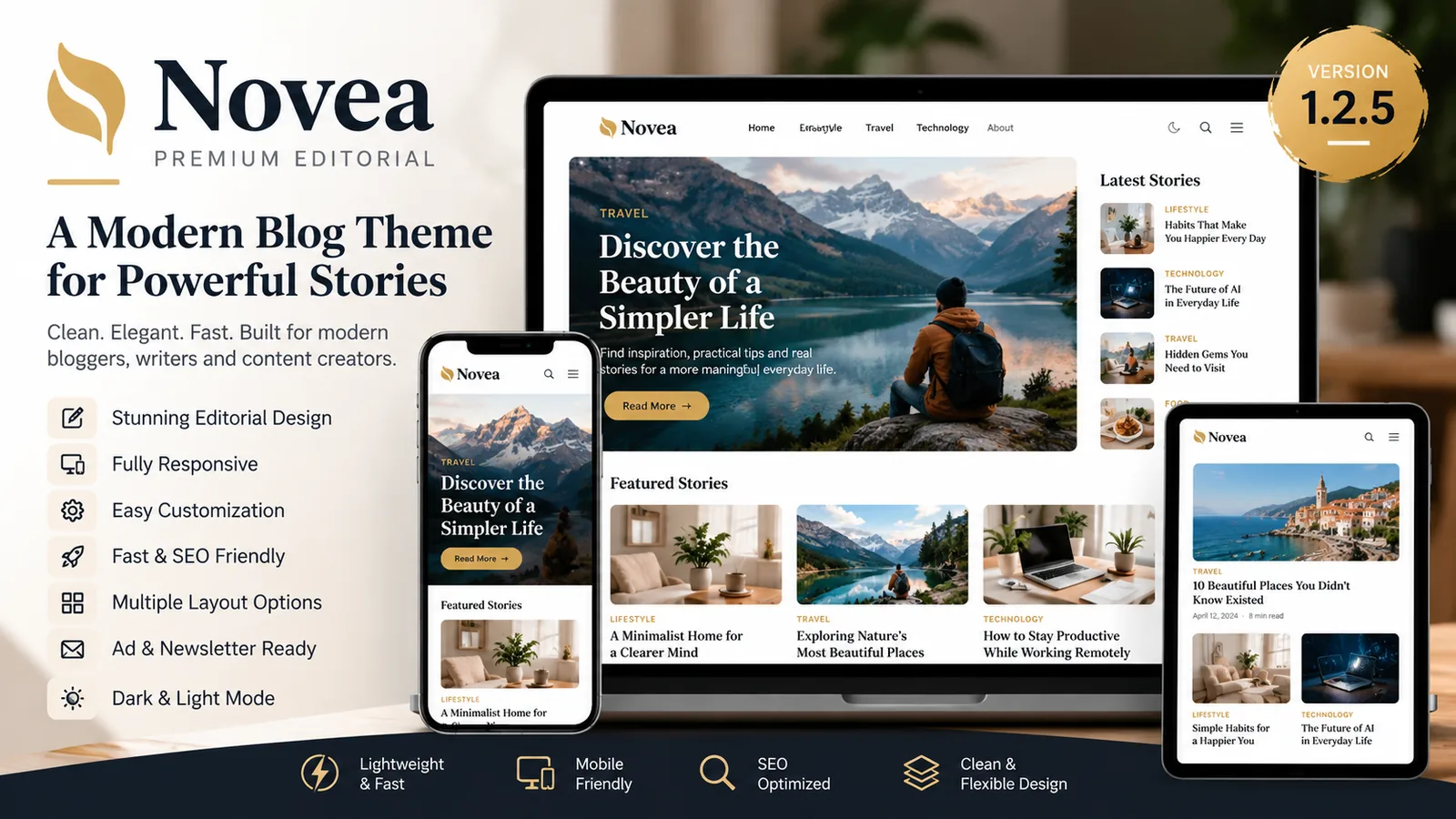
That does not make Novea the right theme for every site. If you want to design highly custom landing pages block by block with free-form positioning, a visual builder may still suit you better. The point is that the builder should answer a requirement, not appear by default because “professional WordPress sites use Elementor.”
When Elementor is worth adding
There are plenty of situations where Elementor makes sense.
If you are building campaign pages with many custom sections, want precise visual control without writing CSS, or need to hand a design system to a team already trained on Elementor, the builder can save a lot of time.
Elementor Pro becomes more relevant when the project needs features such as site-wide template building, dynamic content, forms, popups or WooCommerce layout control. Elementor’s own current product documentation distinguishes these Pro capabilities from the free builder.
For an agency producing many unique marketing sites, that workflow can be easier than learning a different theme’s settings on every project.
So the useful question is not:
“Is Elementor good?”
It is:
“Which part of my site cannot be handled comfortably by the theme and WordPress itself?”
If you can name that part, you can decide whether Elementor solves it.
What about Elementor Free vs Elementor Pro?
If you decide that you do want Elementor, the next question is usually whether the free plugin is enough.
For ordinary visual page building, it may be. Elementor’s own documentation says the free version can be used to build complete pages, while Pro adds broader site-building tools such as Theme Builder, WooCommerce Builder, forms, popups and dynamic-content features.
That gives you a useful purchasing rule:
- Start with the theme. See what it already handles.
- Add Elementor Free if you mainly want more freedom when composing individual pages.
- Consider Elementor Pro when you can name a Pro feature the project genuinely depends on.
Buying Pro “just in case” is not a technical requirement. Neither is avoiding Pro on principle. Match the license to the work.
Three common sites, three different answers
It helps to stop thinking about page builders as a yes-or-no preference and look at the site instead.
A writer launching an editorial magazine: if the theme already provides a strong article layout, archives, categories, navigation and the controls needed for typography and branding, I would start without Elementor. The content model is predictable, so a focused editorial theme can do most of the heavy lifting.
A small service business with a homepage, services, about and contact page: a block theme and the Site Editor may be enough. If the business runs frequent campaigns and wants visually different landing pages every month, Elementor starts to make more sense.
A WooCommerce store: Elementor is not required by WooCommerce. Start by checking how the theme handles shop archives, product pages, cart, checkout, account screens and mobile navigation. If the store later needs highly customized product or campaign templates, a builder can be added for that reason rather than by default.
These examples are deliberately ordinary. Most WordPress decisions become easier when you describe the actual pages people need to maintain instead of comparing feature lists in isolation.
When adding Elementor can make the site harder to own
Every additional system becomes another thing the site depends on.
If your theme controls the header, the Customizer controls typography, Elementor controls the homepage, another addon controls Elementor widgets and a separate plugin controls popups, there may be nothing technically wrong with the site. It can still be fast and reliable.
But maintenance becomes more complicated because the design is spread across several places.
There is also a portability question. If important layouts are built in a specific page builder, those layouts normally continue to depend on that builder. WordPress posts, products, media and other core data remain WordPress data, but the page design itself may need rebuilding if you later move to a different system.
This is not a reason to avoid page builders. It is simply a cost that should be visible before you commit.
Do not choose between Elementor and Gutenberg based on speed claims alone
This topic produces a lot of confident claims that are not very useful.
A poorly built block theme can be slow. A carefully configured Elementor site can perform well. Large images, analytics, fonts, hosting, WooCommerce extensions, caching and third-party scripts can matter as much as the editing tool.
Instead of asking which editor is “faster” in the abstract, test the actual stack you plan to use.
Open representative pages from the theme demo and check them with PageSpeed Insights. Look at a normal article or product page, not only the homepage. Then test your own staging site again after installing the plugins you actually need.
The more useful performance question is:
What does this site load to produce the page I need?
If Elementor gives you functionality you would otherwise recreate with several plugins and custom code, the trade-off may be worthwhile. If the theme already does the job cleanly, adding a builder simply because it is popular may be unnecessary.
The 15-minute test before you install a page builder
If you are starting a new WordPress site, run this test before adding Elementor or any other builder.
- Open the theme documentation. Find the instructions for the header, footer, homepage, typography and mobile navigation.
- Use your real content. Replace one demo headline with a long real headline. Add one real image. Create one real article or product.
- Change the global design. Adjust your logo, primary color, typography and content width using the theme’s own controls.
- Edit one important template. If it is a block theme, open Appearance → Editor and inspect the relevant template. If it is a classic theme, check the Customizer or documented theme settings.
- Test the phone layout. Open the menu, search, forms and primary calls to action at a narrow width.
- Write down what you still cannot do. Be specific.
If the list is empty, you probably do not need another builder.
If the list says things such as “I need a completely custom landing-page layout,” “I need conditional templates,” or “our design team needs visual drag-and-drop control,” then a builder becomes a much more rational purchase.
This test also prevents the opposite mistake: forcing yourself to avoid Elementor when it would genuinely make the project easier.
Already using Elementor? Test dependency on staging, not on the live site
If you already have an Elementor site and are wondering whether you can remove it, do not deactivate plugins on a production site just to find out.
Clone the site to staging first.
Then make a short inventory:
- Which pages were built with Elementor?
- Does Elementor control the header or footer?
- Are forms or popups coming from Elementor Pro?
- Are product templates using Elementor’s WooCommerce tools?
- Which pages still use normal WordPress content?
After that, you can disable the builder on staging and see exactly what needs to be rebuilt. This turns “builder lock-in” from an internet argument into a concrete migration estimate for your own site.
A page builder is not an SEO strategy
Choosing Elementor will not make a site rank. Avoiding Elementor will not make it rank either.
Search visibility still depends on the quality and usefulness of the content, crawlability, internal links, technical health, page experience, authority and how well the page answers the searcher’s intent.
Your editing system matters indirectly because it affects how easily you can maintain templates, performance, headings, content and structured pages. But it is infrastructure, not the strategy itself.
If you are buying a theme mainly because you expect it to improve rankings, use our broader WordPress theme buying checklist to evaluate the whole product rather than focusing on the builder logo in the feature list.
Practical example: If you’re building a publisher-style front page, our WordPress magazine homepage tutorial without Elementor includes a downloadable native-block layout, tested Query Loop settings, and template-selection instructions.
So, do you need Elementor?
For many WordPress sites, no.
If a theme already gives you the structure and customization you need, adding Elementor may solve nothing. A block theme can also give you native visual control over templates, headers, footers and global styles through the Site Editor.
For other projects, Elementor is exactly the right tool. If you need custom visual layouts, a mature builder ecosystem or Pro features that replace work you would otherwise do manually, it can make the site easier to build and hand over.
The mistake is treating the choice as a rule.
Start with the site you need to build. Then choose the smallest editing stack that lets you build and maintain it comfortably.
If you are specifically looking for a content-focused theme that does not assume an Elementor-first workflow, compare Novea and the free Northpeak against your own requirements. You can also browse all ThemeScorpion WordPress themes and compare their editing models before choosing.